Jev + Browser Use
Start with the browser-agent pattern: state and allowed actions go to Jev, then browser code executes the selected action.
Explore the browser pattern →Start in the Playground without writing code. When the decision works, create a TypeSafe API key and connect the hosted Jev model through HTTP, Python, JavaScript, or the official TypeSafe skill for coding agents.
The official Playground is the quickest way to see whether a task fits Jev. Paste a representative state, add one narrow question, and inspect the typed answer and probabilities before building an integration.
You only need this step when code will call Jev. The interface may change, but the security rule does not: copy the new key once, store it outside your source code, and never publish it.
Log in, then select API Keys from the sidebar. The Playground remains available for no-code tests.
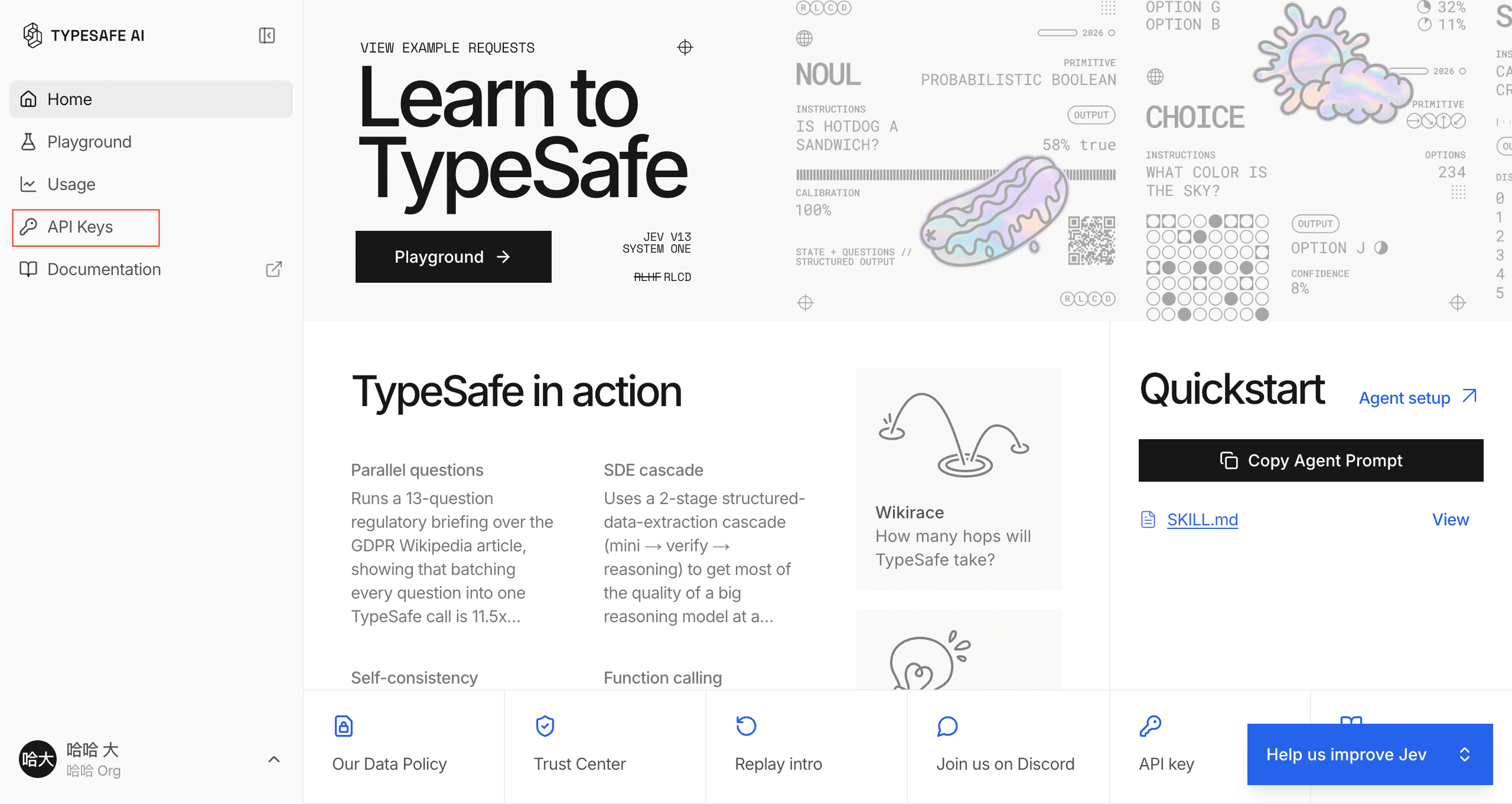
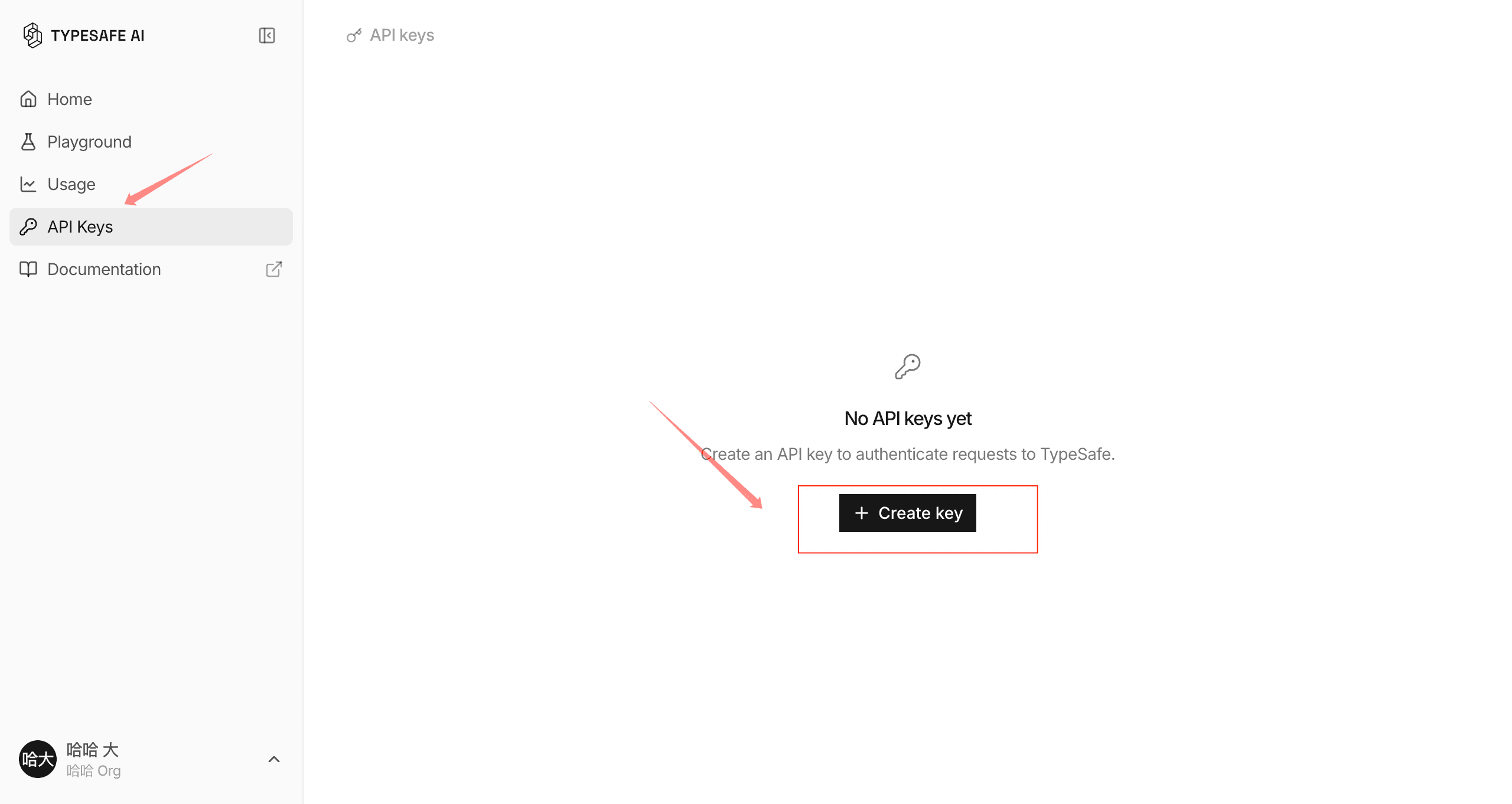
On the API Keys page, choose Create key.
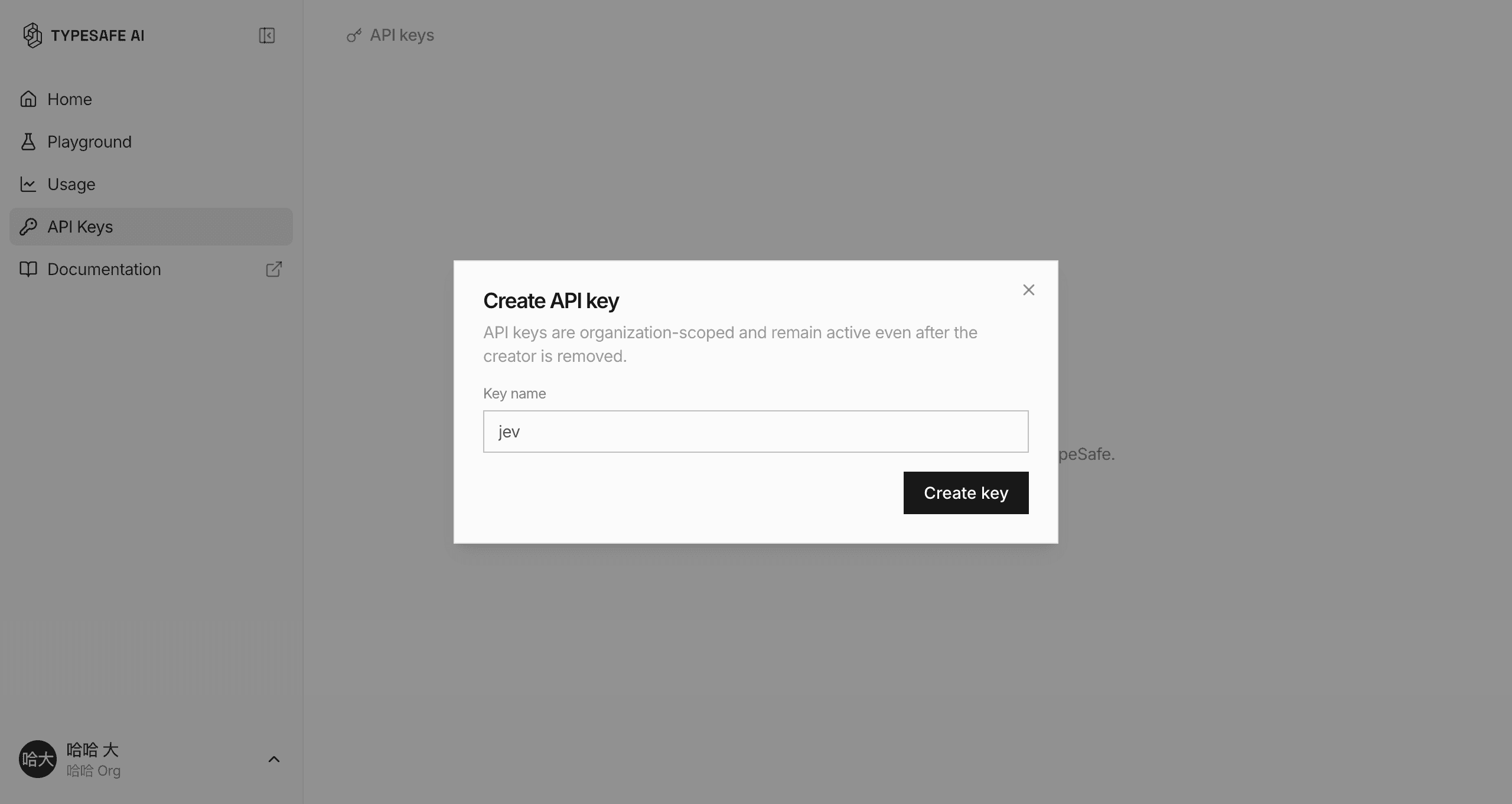
Use a name that identifies the project or environment, then create the key.
The console shows the full value once. This tutorial image uses a redacted example; do not publish an unredacted key.
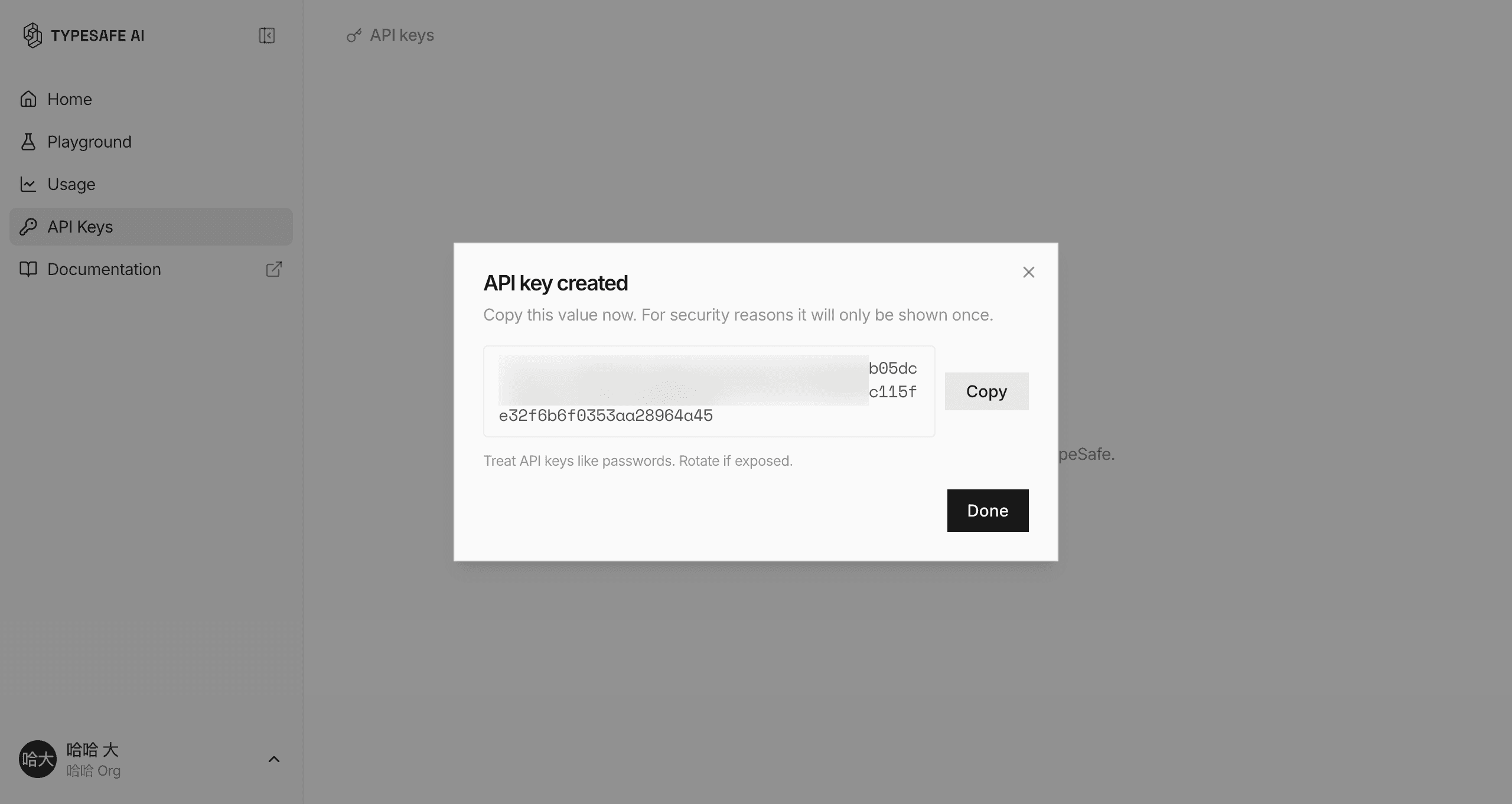
Save the value as TYPESAFE_API_KEY in a local or deployment environment variable. If a real key appears in public material, rotate it.
TypeSafe's official skill gives a coding agent current guidance for designing questions, reading the live documentation, and composing Jev workflows. Use one installation method for your environment.
Install the TypeSafe skill. If you're in Claude Code, run `claude plugin marketplace add typesafe-ai/skills`, then `claude plugin install typesafe@typesafe-ai`. If you're in another agent, run `npx skills add typesafe-ai/skills --skill typesafe-ai` and select your agent. Use one installation method. You can read the skill directly at https://github.com/typesafe-ai/skills/blob/main/skills/typesafe-ai/SKILL.md (raw: https://raw.githubusercontent.com/typesafe-ai/skills/main/skills/typesafe-ai/SKILL.md). Then use the TypeSafe skill when working on this project.claude plugin marketplace add typesafe-ai/skills
claude plugin install typesafe@typesafe-ainpx skills add typesafe-ai/skills --skill typesafe-aiThis expanded prompt adds project inspection, API-key handling, one smoke test, and verification to the official installation step.
Set up TypeSafe and Jev for this project.

1. Install the official TypeSafe skill using exactly one supported method. For Claude Code, use the TypeSafe marketplace plugin. For Codex, WorkBuddy, or another compatible agent, use the skills installer and select the current agent.
2. Read the live TypeSafe documentation before writing integration code. Treat it as the source of truth.
3. Inspect this project and choose the smallest server-side Jev example that fits its existing language and framework. Do not add a database, UI framework, or unrelated infrastructure.
4. If TYPESAFE_API_KEY is missing, stop and direct me to https://console.typesafe.ai/keys. Never ask me to paste the key into chat. Add only a placeholder to .env.example, keep the real .env file ignored, and never expose the key in browser code.
5. Implement one smoke test using jev-latest with a short state and one bounded Choice, Score, or Noul question. Keep actions, permissions, thresholds, and fallback behavior in code.
6. Run the relevant typecheck, test, and build commands. Then report the files changed, the command to run the example, and anything I still need to do manually.Jev remains hosted by TypeSafe. Your server sends state and typed questions to POST /v1/systemone; your code receives structured answers and decides whether to act, stop, or ask a human.
export TYPESAFE_API_KEY='your-key-here'curl -X POST https://api.typesafe.ai/v1/systemone \
-H "Authorization: Bearer $TYPESAFE_API_KEY" \
-H "Content-Type: application/json" \
-d '{
"state": "The customer says their payment failed twice and they need help today.",
"model": "jev-latest",
"questions": {
"is_urgent": {
"type": "noul",
"instructions": "Does this message convey urgency?"
}
}
}'pip install typesafe-sdkfrom typesafe_sdk import Noul, TypeSafeClient
client = TypeSafeClient()
response = client.system_one(
state="The customer says their payment failed twice and needs help today.",
questions={
"is_urgent": Noul(
instructions="Does this message convey urgency?"
)
},
)
print(response.answers["is_urgent"].noul)npm install @typesafe-ai/sdkimport { choice, TypeSafeClient } from "@typesafe-ai/sdk";
const client = new TypeSafeClient();
const response = await client.systemOne({
state: { message: "The customer says their payment failed twice." },
questions: {
route: choice("Which team should handle this?", {
billing: null,
technical: null,
other: null,
}),
},
});
console.log(response.answers.route.choice);TYPESAFE_API_KEY in browser JavaScript, a screenshot, a chat message, or a Git commit.Define choices.
Do not ask Jev to invent an action your code cannot inspect.
Set review behavior.
Uncertainty must lead to a safe fallback.
Protect secrets.
Keys stay in server-side environment variables.
Test your data.
Vendor demos and community reports are not your result.
Dedicated guides for these environments are planned. These entries lead to the existing patterns, connector record, and API instructions.
Start with the browser-agent pattern: state and allowed actions go to Jev, then browser code executes the selected action.
Explore the browser pattern →The official skill guides development. A runtime connector is a separate integration; review its source and requirements before using it.
Inspect the community MCP connector →A dedicated LangGraph guide is coming later. Begin with the hosted API and identify one bounded decision in your graph.
Start with the API →The official Quick Start sends users to the TypeSafe Console Playground and asks them to log in. Creating an API key is required when your own code or an agent runtime calls the hosted API.
No. The official skill teaches the coding agent how to design and implement TypeSafe workflows. A live call still needs a server-side API key and SDK or HTTP integration, or a separately reviewed runtime connector.
No. Store it in a local or deployment environment variable named TYPESAFE_API_KEY. Use placeholders in examples and rotate the key if it is exposed.
TypeSafe's live documentation and official skill are the source of truth for setup and current API behavior. The WayToAGI article is useful Chinese-language community context, but its claims should be checked against the linked primary sources.